


Knowledge Base
go directly to the main content
Setting up the FRITZ!Box for use with a DSL line
The FRITZ!Box automatically connects to the internet when you connect it to your DSL line and enter your personal account information in the FRITZ!Box user interface. The complete FRITZ!Box range of functions for internet, telephony, and smart home is then available to all of the devices in the home network without restriction.
Note:All instructions on configuration and settings given in this guide refer to the latest FRITZ!OS for the FRITZ!Box.
1 Connecting the FRITZ!Box to the DSL line
- Insert the DSL cable (Y cable) into the 'VDSL' socket on the FRITZ!Box.
- Insert one of the two shorter ends of the cable into the DSL socket and leave the other end of the cable hanging. If you are using the FRITZ!Box on a VDSL bonding line, also insert the second end of the cable into the VDSL bonding socket.
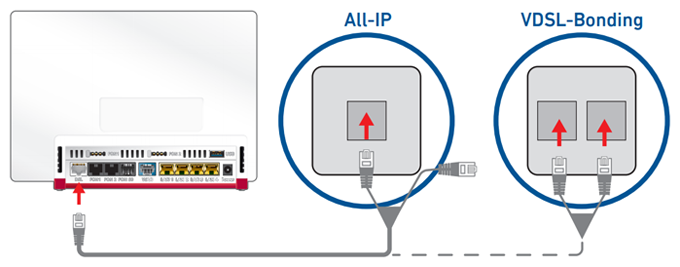
Connecting the FRITZ!Box to an IP-based DSL line (left) or a VDSL bonding line (right)
2 Configuring the internet connection in the FRITZ!Box
- Open the FRITZ!Box user interface.
- Enter the FRITZ!Box password given on the type label of the FRITZ!Box and click on 'Log In'.
- If the wizard for internet access does not start automatically, click on 'Wizards' and then on 'Configure the Internet Connection'.
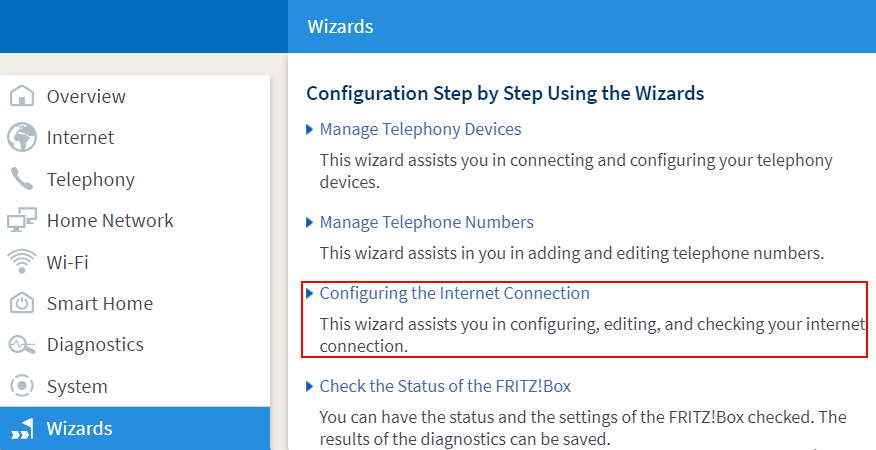
Calling up the FRITZ!Box wizard - If your internet service provider is displayed in the drop-down list, select your internet service provider. If your provider is not listed, select 'more internet service providers'.
- If your internet service provider is not displayed in the drop-down list, select 'other internet service provider'.
- Click on 'Next' and follow the wizard's instructions. The wizard connects the FRITZ!Box to the internet.
Note:If the FRITZ!Box cannot establish an internet connection, the internet service provider may have to activate internet access or the FRITZ!Box. In this case, contact the internet service provider.
3 Setting up telephony in the FRITZ!Box
If you want to connect phones to the FRITZ!Box and use them to make calls over the internet:
- Configure the internet phone numbers in the FRITZ!Box.
 Deutschland
 International (English)
 United Kingdom
 Österreich
 Nederland
 España
 Italia
 Polska
 België (Nederlands)
 Luxemburg (Deutsch)
 Schweiz (Deutsch)