


Knowledge Base
go directly to the main content
Setting up the FRITZ!Box for use with a DSL line
Connect your FRITZ!Box to the DSL line and use MyFRITZ!App or a web browser to configure it. If you are using a web browser for configuration, first refer to our provider-specific guides under Setting up the FRITZ!Box: Guides for different providers. If your provider is not listed there, follow the steps given in this guide.
The FRITZ!Box automatically establishes the internet connection. Then all FRITZ!Box functions for internet, telephony and smart home are available to all of the devices in the home network.
Note:All instructions on configuration and settings given in this guide refer to the latest FRITZ!OS for the FRITZ!Box.
1 Connecting the FRITZ!Box to the DSL line
- Insert the DSL cable into the DSL socket on the FRITZ!Box and into the F socket on the phone jack (TAE) or into the DSL line.
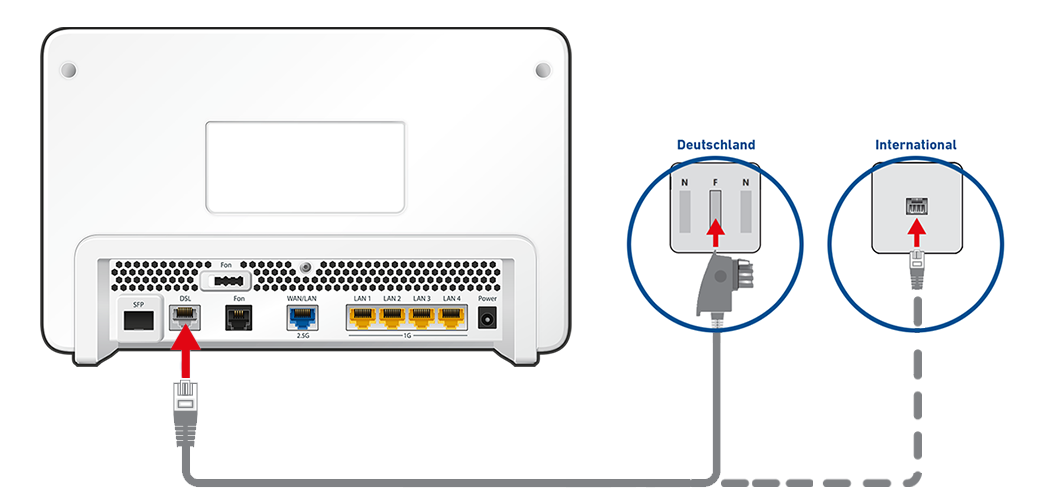
Connecting FRITZ!Box with a DSL line in Germany (left) and in other countries (right)
2 Configuring the internet connection in the FRITZ!Box
- Open the FRITZ!Box user interface.
- Enter the FRITZ!Box password given on the type label of the FRITZ!Box and click on 'Log In'.
- If the wizard for internet access does not start automatically, click on 'Wizards' and then on 'Configure the Internet Connection'.

Calling up the FRITZ!Box wizard - Enable the 'Use DSL/WAN for internet connection' option and click on 'Next'.
- If your internet service provider is displayed in the drop-down list, select your internet service provider. If your provider is not listed, select 'more internet service providers'.
- If your internet service provider is not displayed in the drop-down list, select 'other internet service provider'.
- Click on 'Next' and follow the wizard's instructions. The wizard connects the FRITZ!Box to the internet.
Note:If the FRITZ!Box cannot establish an internet connection, the internet service provider may have to activate internet access or the FRITZ!Box. In this case, contact the internet service provider.
3 Setting up telephony in the FRITZ!Box
If you want to connect phones to the FRITZ!Box and use them to make calls over the internet:
- Configure the internet phone numbers in the FRITZ!Box.
 Deutschland
 International (English)
 United Kingdom
 Österreich
 Nederland
 España
 Italia
 Polska
 België (Nederlands)
 Luxemburg (Deutsch)
 Schweiz (Deutsch)