


Knowledge Base
go directly to the main content
- FRITZ!Box 7690
- FRITZ!Box 7682
- FRITZ!Box 7590 AX
- FRITZ!Box 7590
- FRITZ!Box 7583 VDSL
- FRITZ!Box 7583
- FRITZ!Box 7582
- FRITZ!Box 7581
- FRITZ!Box 7560
- FRITZ!Box 7530 AX
- FRITZ!Box 7530
- FRITZ!Box 7520
- FRITZ!Box 7510
- FRITZ!Box 7490
- FRITZ!Box 7430
- FRITZ!Box 7390
- FRITZ!Box 7360
- FRITZ!Box 6890 LTE
- FRITZ!Box 6850 LTE
- FRITZ!Box 6840 LTE
- FRITZ!Box 6820 LTE
- FRITZ!Box 6690 Cable
Web browser reports that connection to FRITZ!Box is not safe
When you try to open the FRITZ!Box user interface, the web browser displays one of the following messages:
- 'Your connection is not private' (Google Chrome)
- 'Your connection is not private' (Microsoft Edge)
- 'Warning: Potential Security Risk Ahead' (Mozilla Firefox)
- 'This connection is not secure' (Mozilla Firefox)
- 'This Connection is Not Private' (Apple Safari)
The messages are either displayed in the web browser's address bar, when you enter the password for the user interface, or in the web browser itself. Note the information given in the corresponding section.
1 Web browser shows a non-encrypted connection
If the web browser displays 'Not secure' or a lock with a red line through it  , you can ignore this message.

Internet browsers flag unencrypted or only partially encrypted websites as not secure because data entered can be intercepted by third parties. However, you open the FRITZ!Box user interface within your home network, and no data is transmitted over the internet.
2 Firefox reports 'This connection is not secure'
If Firefox displays the message 'This connection is not secure. Logins entered here could be compromised' when you enter the the password, you can ignore this message.

Firefox warns against sending passwords over unencrypted connections because they could be intercepted by third parties. However, you open the FRITZ!Box user interface within your home network, and your password is not transmitted over the internet.
3 Web browser warns about unknown security certificate
If the web browser displays a certificate warning instead of the FRITZ!Box user interface, this is due to the FRITZ!Box's unique security certificate.
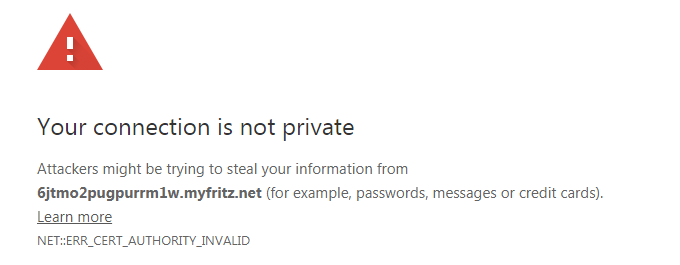
With HTTPS connections, the web browser examines the certificate of the website that was accessed. Since the certificate authorities do not recognize the FRITZ!Box's certificate, the browser classifies the connection as insecure.
We recommend using MyFRITZ!Net for access via the internet. It uses a certificate from letsencrypt.org so that the web browser does not display a certificate warning.
When accessing it from the home network or using a different dynamic DNS provider, confirm the web browser's certificate warning. This does not pose a security risk.
-
Google Chrome
- In Chrome, click on 'Advanced' under the certificate warning and then on 'Proceed to [...] (unsafe)'.
-
Microsoft Edge
- In Edge, click on 'Advanced' under the certificate warning and then on 'Proceed to [...] (unsafe)'.
-
Mozilla Firefox
- In Firefox, click on 'Advanced' and then on 'Accept the Risk and Continue' under the certificate warning.
-
Apple Safari (iOS)
- In Safari, tap on 'Show Details' under the certificate warning and then on 'visit this website'.
- Click on 'Visit website'.
-
Apple Safari (macOS)
- In Safari, click on 'Show Certificate' under the certificate warning and then on 'visit this website'.
- Click on 'Visit Website'.
- Enter the password of your macOS user account and click on 'Update settings'.
 Deutschland
 International (English)
 United Kingdom
 Österreich
 Nederland
 España
 Italia
 Polska
 België (Nederlands)
 Luxemburg (Deutsch)
 Schweiz (Deutsch)