


Knowledge Base
go directly to the main content
Connecting FRITZ!Powerline to the FRITZ!Repeater (Mesh Master)
With FRITZ!Powerline you can quickly and easily add an additional wireless access point to your FRITZ!Repeater home network. During setup, the FRITZ!Powerline device is automatically integrated into the FRITZ! Mesh. The FRITZ!Powerline device adopts all of the Wi-Fi settings of the FRITZ!Repeater that establishes the internet connection (Mesh Master), such as access information and guest access, and can be used directly by all of the wireless devices in the home network.
There are various ways to connect the FRITZ!Powerline device to the home network of your FRITZ!Repeater (Mesh Master). Which connection type makes the most sense for you depends on your operational environment.
1 Connecting the FRITZ!Powerline device to the FRITZ!Repeater (Mesh Master) via powerline
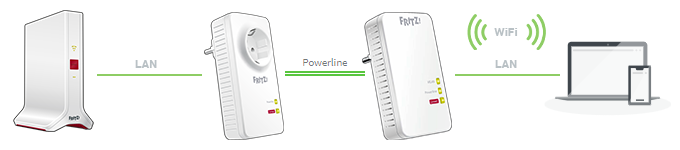
A powerline connection to the FRITZ!Repeater (Mesh Master) makes sense if
- you want to place the FRITZ!Powerline device outside the Wi-Fi range of the FRITZ!Repeater or a Mesh Repeater in the home network.
- you want to integrate a device without Wi-Fi, for example an IPTV receiver, into the home network via the LAN port on the FRITZ!Powerline device.
- it should be possible to reposition the FRITZ!Powerline device quickly and easily if necessary.
Just follow these steps: Connecting FRITZ!Powerline to the FRITZ!Repeater (Mesh Master) via powerline
2 Connecting the FRITZ!Powerline device to the FRITZ!Repeater (Mesh Master) via LAN
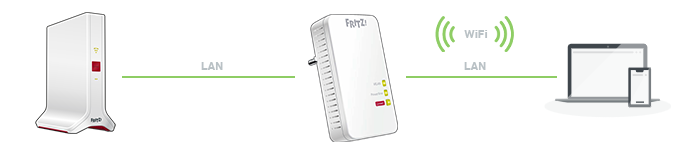
A LAN connection to the FRITZ!Repeater (Mesh Master) makes sense if
- you want to place the FRITZ!Powerline device outside the Wi-Fi range of the FRITZ!Repeater or a Mesh Repeater in the home network.
- it is possible to establish a LAN connection to the FRITZ!Repeater from where the FRITZ!Powerline device is being used, for example using the existing cabling in your home.
Just follow these steps: Connecting FRITZ!Powerline to the FRITZ!Repeater (Mesh Master) via LAN
3 Connecting the FRITZ!Powerline device to the FRITZ!Repeater (Mesh Master) via Wi-Fi
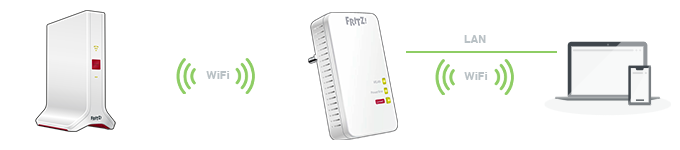
A Wi-Fi connection to the FRITZ!Repeater (Mesh Master) makes sense if
- you want to place the FRITZ!Powerline device within the Wi-Fi range of the FRITZ!Repeater.
- you want to integrate a device without Wi-Fi, for example an IPTV receiver, into the home network via the LAN port on the FRITZ!Powerline device.
Just follow these steps: Connecting FRITZ!Powerline to the FRITZ!Repeater (Mesh Master) via Wi-Fi
 Deutschland
 International (English)
 United Kingdom
 Österreich
 Nederland
 España
 Italia
 Polska
 België (Nederlands)
 Luxemburg (Deutsch)
 Schweiz (Deutsch)