


Knowledge Base
go directly to the main content
- FRITZ!Box 7690
- FRITZ!Box 7682
- FRITZ!Box 7590 AX
- FRITZ!Box 7590
- FRITZ!Box 7583 VDSL
- FRITZ!Box 7583
- FRITZ!Box 7582
- FRITZ!Box 7581
- FRITZ!Box 7560
- FRITZ!Box 7530 AX
- FRITZ!Box 7530
- FRITZ!Box 7520
- FRITZ!Box 7510
- FRITZ!Box 7490
- FRITZ!Box 7430
- FRITZ!Box 7390
- FRITZ!Box 7360
- FRITZ!Box 6890 LTE
- FRITZ!Box 6850 5G
- FRITZ!Box 6850 LTE
- FRITZ!Box 6820 LTE
- FRITZ!Box 6690 Cable
- FRITZ!Box 6670 Cable
- FRITZ!Box 6660 Cable
- FRITZ!Box 6591 Cable
- FRITZ!Box 6590 Cable
- FRITZ!Box 6490 Cable
- FRITZ!Box 6430 Cable
- FRITZ!Box 5690 Pro
- FRITZ!Box 5690
- FRITZ!Box 5590 Fiber
- FRITZ!Box 5530 Fiber
- FRITZ!Box 5491
- FRITZ!Box 5490
- FRITZ!Box 4060
- FRITZ!Box 4050
- FRITZ!Box 4040
- FRITZ!Box 4020
- FRITZ!Box 3490
- FRITZ!Mesh Set 1600
- FRITZ!Repeater 6000
- FRITZ!Repeater 3000 AX
- FRITZ!Repeater 3000
- FRITZ!Repeater 2400
- FRITZ!Repeater 1750E
- FRITZ!Repeater 1200 AX
- FRITZ!Repeater 1200
- FRITZ!WLAN Repeater 1160
- FRITZ!Repeater 600
- FRITZ!WLAN Repeater 450E
- FRITZ!WLAN Repeater 310
- FRITZ!WLAN Repeater DVB-C
- FRITZ!Powerline 1260
- FRITZ!Powerline 1260E
- FRITZ!Powerline 1240 AX
- FRITZ!Powerline 1240E
- FRITZ!Powerline 546E
- FRITZ!Powerline 540E
Accessing Mesh Repeaters over the internet
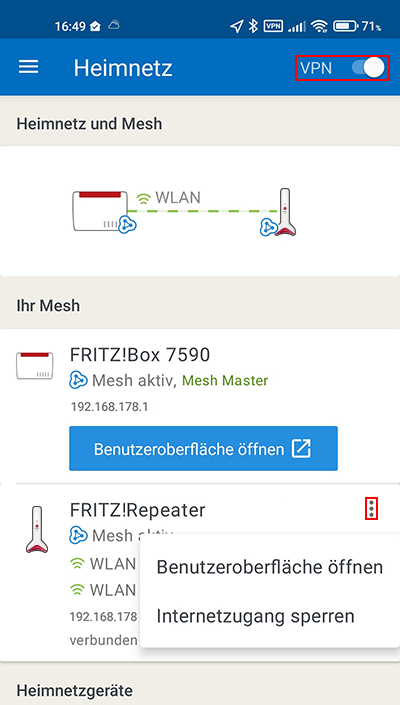
With MyFRITZ!App for Android, you can easily access the user interface of your Mesh Repeaters over the internet. It does not matter whether the Mesh Repeater is a FRITZ!Repeater or FRITZ!Powerline.
Install the MyFRITZ!App for Android on your smartphone or tablet, log in to the Mesh Master (FRITZ!Box or other FRITZ!Repeater), and set up the VPN connection in the settings of the app with just a single click. Then you can establish a VPN connection to the Mesh Master under 'Home Network' in the MyFRITZ!App and open the user interfaces of your Mesh Repeaters.
Alternatively, you can also use WireGuard to establish a VPN connection to the Mesh Master and access your Mesh Repeaters via the Mesh Overview of the Mesh Master:
- Setting up a WireGuard VPN to the FRITZ!Repeater on a smartphone or tablet
- Setting up a WireGuard VPN to the FRITZ!Repeater on the computer
Important:If you access a Mesh Repeater via a LAN-to-LAN linkup (for instance, a WireGuard connection between two FRITZ! networks) and are asked for a username and password, you have to log in with the Mesh Repeater using a user configured with internet access rights ("Access from the internet allowed").
 Deutschland
 International (English)
 United Kingdom
 Österreich
 Nederland
 España
 Italia
 Polska
 België (Nederlands)
 Luxemburg (Deutsch)
 Schweiz (Deutsch)