


Knowledge Base
go directly to the main content
Knowledge Base document #3269
FRITZ!DECT 200
This support document is available for the following products:
- FRITZ!Box 7690
- FRITZ!Box 7682
- FRITZ!Box 7590 AX
- FRITZ!Box 7590
- FRITZ!Box 7583 VDSL
- FRITZ!Box 7583
- FRITZ!Box 7530 AX
- FRITZ!Box 7530
- FRITZ!Box 7520
- FRITZ!Box 7510
- FRITZ!Box 7490
- FRITZ!Box 6890 LTE
- FRITZ!Box 6850 5G
- FRITZ!Box 6850 LTE
Setting up the switch on sound function for FRITZ! smart plug
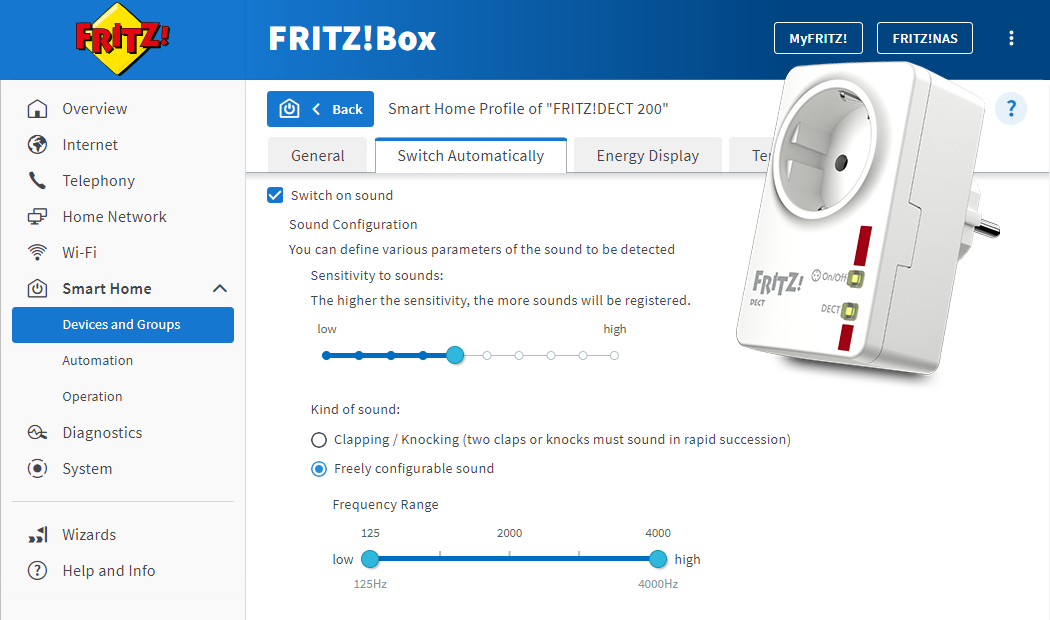
You can configure the smart plug, for example FRITZ!Smart Energy 200, so that it automatically switches when it detects certain sounds. It switches when it detects clapping, knocking, or a different sound you specify.
For example, you can configure it so that the light in your garage turns on automatically when steps or voices can be heard and then turns off again after 10 minutes.
Requirements / Restrictions
- When using a FRITZ!DECT 200, the Actuator Identification Number (AIN) must be greater than or equal to 08761 0006021. Devices with a lower AIN do not support sound detection.
Note:You can find the actuator identification number in the general settings for FRITZ!DECT 200 in the "Smart Home" menu in the FRITZ!Box user interface.
Note:All instructions on configuration and settings given in this guide refer to the latest FRITZ!OS for the FRITZ!Box.
1 Setting up sound activation to control switching
- Click "Smart Home" in the FRITZ!Box user interface.
- Click "Devices and Groups" or "Device Management" in the "Smart Home" menu.
- Click the
 (Edit) button for the device you want to switch.
 - Click on the "Switch Automatically" tab.
- Enable the option "Switch on sound".
- Move the control under "Sensitivity to sounds" to the appropriate setting that will trigger the desired switching event. The setting depends on the level of ambient noise and the volume of the sound itself.
- Enable the option "Clapping / Knocking".
- Select the period for this switching and how it should be switched.
- Click "Apply" or "OK" to save the settings.
2 Setting up switching via freely configurable sound
- Click "Smart Home" in the FRITZ!Box user interface.
- Click "Devices and Groups" or "Device Management" in the "Smart Home" menu.
- Click the (Edit) button for the device you want to switch.
- Click on the "Switch Automatically" tab.
- Enable the option "Switch on sound".
- Move the control under "Sensitivity to sounds" to the appropriate setting that will trigger the desired switching event. The setting depends on the level of ambient noise and the volume of the sound itself.
- Enable the option "Freely configurable sound".
- Move the control under "Frequency Range" to the appropriate setting that will trigger the desired switching event. The setting depends on the kind of sound.
- For the "Duration", enter the value for the duration of the sound that you want to trigger switching with. The appropriate value depends on the kind of sound.
- Enable the option "Switch on sound" or "Switch on silence".
- Select the period for this switching and how it should be switched.
- Click "Apply" or "OK" to save the settings.
 Deutschland
 International (English)
 United Kingdom
 Österreich
 Nederland
 España
 Italia
 Polska
 België (Nederlands)
 Luxemburg (Deutsch)
 Schweiz (Deutsch)