Identifying high-energy devices and saving costs with the FRITZ! smart plug
You can easily identify energy-intensive devices in your household by testing them with a FRITZ! smart plug. You can then view the energy consumed by the device in your FRITZ!Box user interface or in the FRITZ!App Smart Home and then take appropriate action. For example, you can reduce the energy consumption by setting up automatic switching for the smart plug or by switching it on and off manually, e.g. via a FRITZ! smart switch. However, the measurement data is for informational purposes only and may not be used for billing purposes because no calibration has been performed.
1 Recording energy consumption
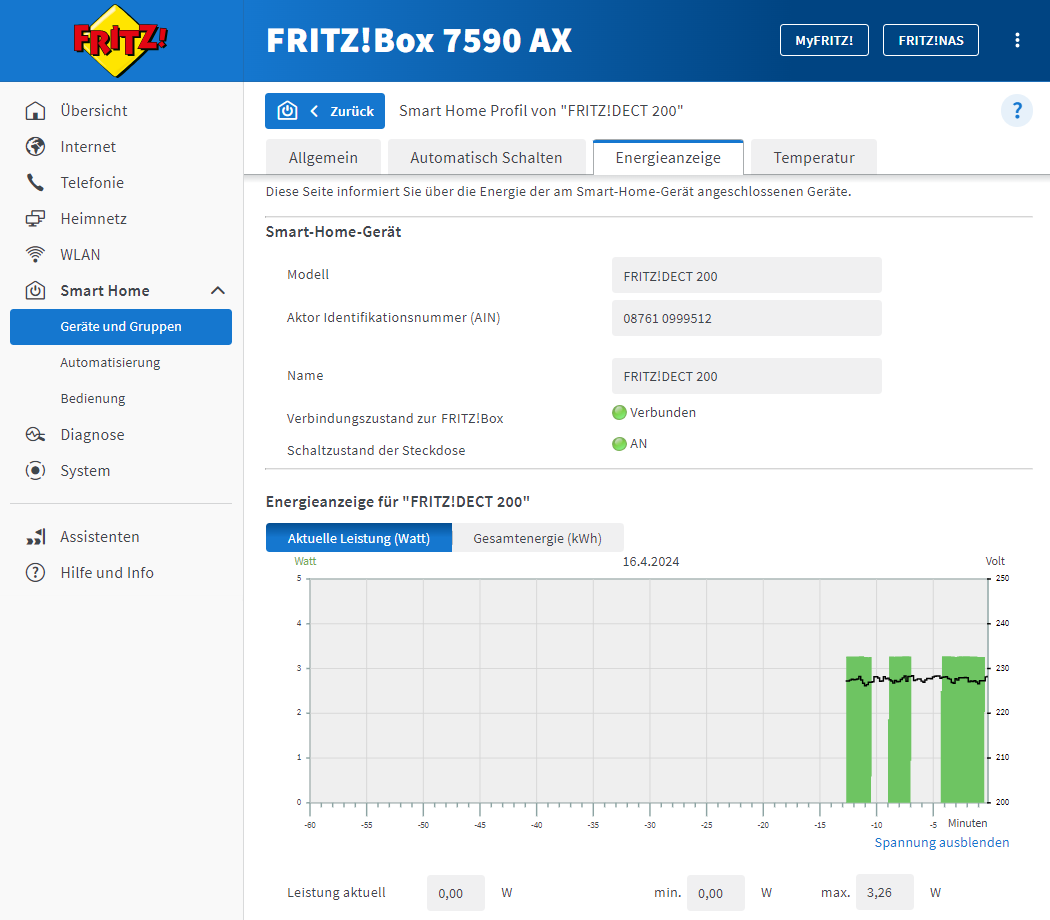
Energy display on the profile page of the FRITZ! smart plug Plug your FRITZ! smart plug into a wall outlet and connect the device you want to check.
Switch on the device and use it for a short time.
Switch the device off again to also record the energy consumption in standby mode.
In the 'Smart Home' menu of the FRITZ!Box user interface, observe the current consumption of the device in real time on the 'Energy Display' tab of the profile page of the smart plug. You can also do this with FRITZ!App Smart Home.
Repeat these steps several times to get representative results.
Based on the test results you can decide what steps to take in order to reduce the energy consumption of the connected device. For example, you can create a routine for the smart plug so that the connected device is only switched on automatically under predefined conditions. Or you can use the 'Switch off on standby' option on the profile page of the FRITZ! smart plug to switch the smart plug off automatically as soon as its energy consumption falls below the specified value. If the device's energy consumption is excessively high, it may be worthwhile to replace it with a more energy-efficient model.


 Deutschland
 International (English)
 United Kingdom
 Österreich
 Nederland
 España
 Italia
 Polska
 België (Nederlands)
 Luxemburg (Deutsch)
 Schweiz (Deutsch)