


Knowledge Base
go directly to the main content
Setting up the FRITZ!Box for use with a Convergenze line
The FRITZ!Box is optimally prepared for use with Convergenze. Simply connect the FRITZ!Box to the internet connection and select Convergenze as the internet service provider in the FRITZ!Box. The complete FRITZ!Box range of functions for internet, multimedia, and smart home is then available to all of the devices in the home network without restriction.
Important:Currently, we do not have any information about whether the FRITZ!Box can make calls over Convergenze and if so, how to configure the phone numbers in the FRITZ!Box. As soon as we have any new information, we will update this guide.
1 Connecting the FRITZ!Box
- Either connect the FRITZ!Box to the DSL line or use the 'WAN' port to connect the FRITZ!Box to the fiber optic modem (ONT, Optical Network Termination). For detailed information, refer to the quick guide included with the FRITZ!Box and the manuals.
2 Configuring the internet connection in the FRITZ!Box
- Open the FRITZ!Box user interface.
- Enter the FRITZ!Box password given on the type label of the FRITZ!Box and click on 'Log In'.
- If the wizard for internet access does not start automatically, click on 'Wizards' and then on 'Configure the Internet Connection'.
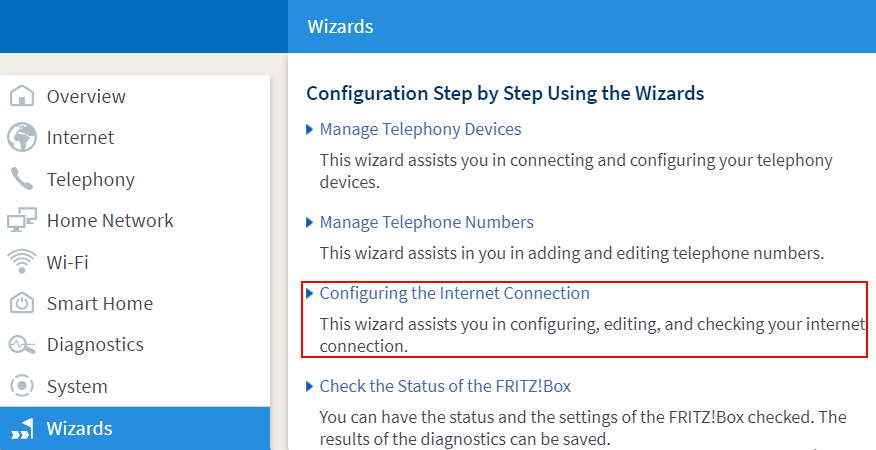
Calling up the FRITZ!Box wizard - If you are using the FRITZ!Box on an ADSL or a VDSL line, select 'Convergenze DSL' from the drop-down list.
- If you are using the FRITZ!Box on a fiber optic connection (FTTH), select 'Convergenze' from the drop-down list.
- Click on 'Next' and follow the wizard's instructions. The wizard connects the FRITZ!Box to the internet.
Important:If the FRITZ!Box cannot establish an internet connection, your internet access may not have been activated yet. In this case, contact Convergenze.
 Deutschland
 International (English)
 United Kingdom
 Österreich
 Nederland
 España
 Italia
 Polska
 België (Nederlands)
 Luxemburg (Deutsch)
 Schweiz (Deutsch)