


Knowledge Base
go directly to the main content
- FRITZ!Box 7690
- FRITZ!Box 7682
- FRITZ!Box 7590 AX
- FRITZ!Box 7590
- FRITZ!Box 7583 VDSL
- FRITZ!Box 7583
- FRITZ!Box 7582
- FRITZ!Box 7560
- FRITZ!Box 7530 AX
- FRITZ!Box 7530
- FRITZ!Box 7520
- FRITZ!Box 7510
- FRITZ!Box 7490
- FRITZ!Box 7430
- FRITZ!Box 7390
- FRITZ!Box 7360
- FRITZ!Box 6890 LTE
- FRITZ!Box 6850 5G
- FRITZ!Box 6850 LTE
- FRITZ!Box 6840 LTE
Changing FRITZ!Box's Wi-Fi security settings
You want to change the FRITZ!Box's Wi-Fi password? ✔ In the user interface, you can easily change all of the encryption settings.
You can easily change the FRITZ!Box's Wi-Fi security settings and configure a new Wi-Fi network key for your Wi-Fi, for example. The FRITZ!Box (Mesh Master) automatically transmits changed Wi-Fi security settings to all Mesh Repeaters (for example FRITZ!Repeater) so that wireless devices in the FRITZ! Mesh can always use the same Wi-Fi access information to log on.
When you change the security settings, note that you must then reconfigure the Wi-Fi connection on all of the wireless devices.
Note:All instructions on configuration and settings given in this guide refer to the latest FRITZ!OS for the FRITZ!Box.
1 Enabling the Wi-Fi network
- Click on 'Wi-Fi' in the FRITZ!Box user interface.
- Click on 'Wi-Fi Network' in the 'Wi-Fi' menu.
- In the 'Active Frequency Bands' section, enable the Wi-Fi network for the 2.4-GHz and 5-GHz frequency bands.
- Click on 'Apply' to save the settings.
- Click on 'Wi-Fi' in the FRITZ!Box user interface.
- Click on 'Security' in the 'Wi-Fi' menu.
- Click on the 'Encryption' tab.
- If you want to use secure WPA encryption (recommended):
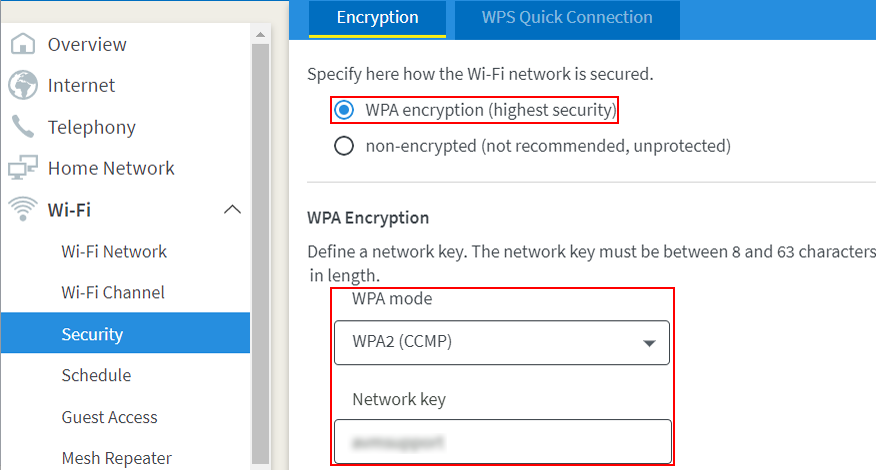
Adjusting the Wi-Fi encryption in the user interface - Enable the 'WPA encryption' option.
- Select 'WPA2 (CCMP)' for the 'WPA mode'. If you are still using older wireless devices that do not support WPA2 encryption, select 'WPA + WPA2'.
- If you do not want to use encryption (not recommended), which would leave your Wi-Fi network unprotected, enable the 'non-encrypted' option.
- Click on 'Apply' to save the settings.
Now the popup window 'Access to Wi-Fi' with the new Wi-Fi access information for the FRITZ!Box opens. Print out or make note of the new Wi-Fi access information and reconfigure the Wi-Fi connection to the FRITZ!Box.
 Deutschland
 International (English)
 United Kingdom
 Österreich
 Nederland
 España
 Italia
 Polska
 België (Nederlands)
 Luxemburg (Deutsch)
 Schweiz (Deutsch)