


Knowledge Base
go directly to the main content
To the knowledge base
Knowledge Base document #3654
Setting up FRITZ!Box for use with an Orange line
To use the FRITZ!Box with an Orange line, simply connect it to the cable modem from Orange and configure the internet connection in the FRITZ!Box. The complete FRITZ!Box range of functions for internet, television (Digitale TV), and smart home is then available to all of the devices in the home network without restriction.
1 Connecting a cable modem
- Either connect the cable modem to the first multimedia socket or to the socket that the cable technician used for the original installation. Only use the coaxial cable (without an extension) provided by the cable technician to connect it.
2 Configuring the cable modem
- Enable the so-called bridge mode for the cable modem from Orange. Refer to the guide Accéder au mode Bridge for instructions.
3 Configuring the internet connection in the FRITZ!Box
- Open the FRITZ!Box user interface.
- Enter the FRITZ!Box password given on the type label of the FRITZ!Box and click on 'Log In'.
- If the wizard for internet access does not start automatically, click on 'Wizards' and then on 'Configure the Internet Connection'.
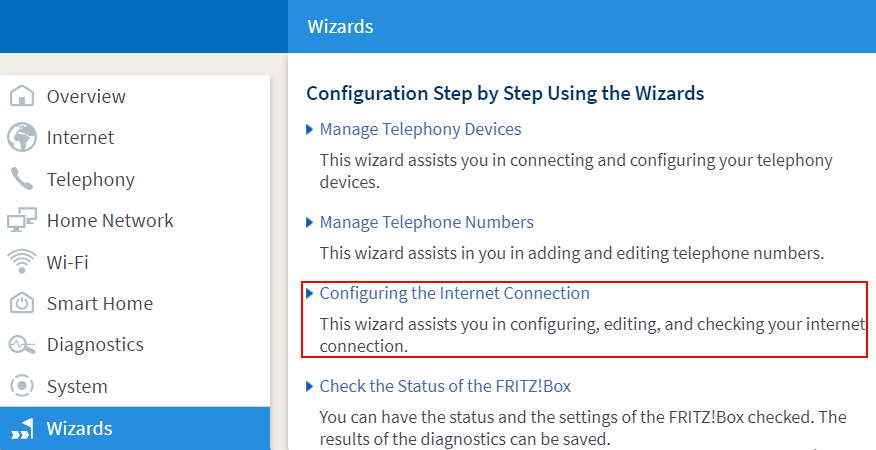
Calling up the FRITZ!Box wizard - Select 'existing connection over LAN' from the drop-down list.
- Click on 'Next' and follow the wizard's instructions. The wizard guides you through the configuration of the internet connection and indicates when to use a network cable to connect the 'LAN 1' port on the FRITZ!Box to 'Port 4' on the cable modem.
 Deutschland
 International (English)
 United Kingdom
 Österreich
 Nederland
 España
 Italia
 Polska
 België (Nederlands)
 Luxemburg (Deutsch)
 Schweiz (Deutsch)