


Knowledge Base
go directly to the main content
Connecting the FRITZ!Box with the DSL and phone line (analog / ISDN)
You can connect your FRITZ!Box with a DSL line and an additional phone line (analog or ISDN). If you have a DSL line without an additional phone line, proceed as described in the guide Connecting the FRITZ!Box with the DSL line.
Not all of the cables and adapters mentioned in this guide are included with every FRITZ!Box. If you are missing cables or adapters, you can either purchase them from an electronics retailer, or you can make your own using the guide Assignment of cables, adapters, and sockets.
Note:Our sales team can provide you with information on country-specific FRITZ!Box models, which are delivered with suitable cables and adapters.
Prerequisites
- The DSL line must comply with a DSL standard supported by the FRITZ!Box.
- The ISDN line must be a point-to-multipoint line. When used on a point-to-point line, proceed as described in the guide Using the FRITZ!Box on an ISDN BRI.
Note:All instructions on configuration and settings given in this guide refer to the latest FRITZ!OS for the FRITZ!Box.
1 Connecting the FRITZ!Box to the DSL line in Germany
Connecting all phones and telephony devices to the FRITZ!Box
- Remove all telephony devices, cables, and additional phone jacks from the first (main) phone jack in your home.
Important:Disruptions on the DSL and phone connection can occur if cables or devices other than the DSL splitter are connected to the first phone jack.
- Connect only the DSL splitter to the first phone jack that you received from your DSL provider: Insert the cable into the 'Amt' socket on the DSL splitter and the other end in the 'F' socket on the phone jack.
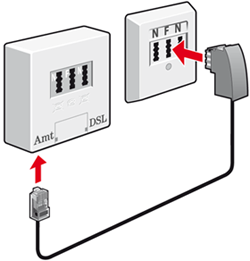
Connecting a DSL splitter (left) with the phone wall socket (right) - Connect all analog terminal devices to the FRITZ!Box.
Connecting the FRITZ!Box to the DSL and phone line
- Insert the longer end of the DSL/phone cable (Y cable) into the 'DSL' socket on the FRITZ!Box.
- Plug the gray plug of the Y cable into the socket on the DSL splitter labeled 'DSL'.
- If you are using the FRITZ!Box on an ISDN line, plug the black plug of the Y cable into a socket on the ISDN NT.
- If you are using the FRITZ!Box on an analog phone line:
- Insert the black plug of the Y cable into the black TAE/RJ45 adapter included with delivery.
- Insert the black TAE/RJ45 adapter into the TAE socket on the DSL splitter labeled 'F' or 'N'. The adapter fits in only one of the two sockets.
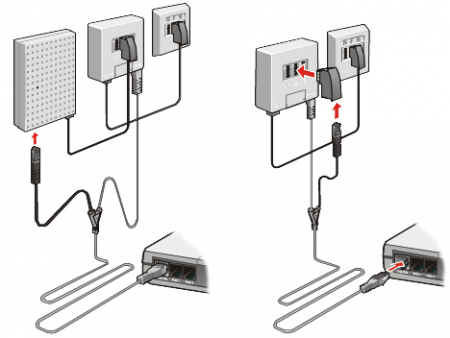
Connecting to ISDN (left) and an analog phone line (right) - If you are using the FRITZ!Box on an analog phone line:
2 Connecting the FRITZ!Box to the DSL line in Austria
- Plug the DSL splitter into the left socket (marked with a triangle) of the phone jack (TDO).
- Insert the longer end of the DSL/phone cable (Y cable) into the 'DSL' socket on the FRITZ!Box.
- Insert the gray plug of the Y cable into the DSL socket of the DSL splitter; you may have to use the gray RJ45/RJ11 adapter to do so.
- If you are using the FRITZ!Box on an ISDN line, plug the black plug of the Y-branch into a socket on the ISDN NT.
- If you are using the FRITZ!Box on an analogue phone line:
- Plug the black TST/RJ11 adapter into the socket of your phone jack (TDO) marked with a circle.
Important:You cannot connect telephony devices to the socket of the splitter marked with the phone receiver. Connect all analog devices to the FRITZ!Box.
- Insert the black plug of the Y-shaped cable into the TST/RJ11 adapter; you may have to use the black RJ45/RJ11 adapter to do so.
- Plug the black TST/RJ11 adapter into the socket of your phone jack (TDO) marked with a circle.
- If you are using the FRITZ!Box on an analogue phone line:
3 Connecting the FRITZ!Box to the DSL line in Switzerland
- Insert the ADSL filter into the phone jack.
Note:For information about the ADSL filter, contact your DSL provider, from whom you normally receive the ADSL filter.
- Insert the longer end of the DSL/phone cable (Y cable) into the 'DSL' socket on the FRITZ!Box.
- Insert the gray plug of the Y-shaped cable into the DSL socket of the ADSL filter; you may have to use the gray RJ45/RJ11 adapter to do so.
- If you are using the FRITZ!Box on an ISDN line, plug the black plug of the Y-branch into a socket on the ISDN NT.
- If you are using the FRITZ!Box on an analog phone line:
- Insert the TT89/RJ11 adapter included with delivery into the TT89 socket (Reichle socket) of the ADSL filter.
- Insert the black plug of the Y-shaped cable into the TT89/RJ11 adapter; you may have to use the black RJ45/RJ11 adapter to do so.
4 Configuring the FRITZ!Box
Setting the country of use
- Click on 'System' in the FRITZ!Box user interface.
- Click on 'Region and Language' in the 'System' menu.
- Click on the 'Region' tab.
- Select your country from the drop-down list. If your country is not displayed, select 'Other country'.
Important:When the regional options are changed, the phone settings (for example telephony devices, call diversion settings, dialling rules) are reset and must be reconfigured.
- If you are asked for the time zone, select the correct time zone.
- Click on 'Apply' to save the settings.
Selecting the DSL standard
- Click on 'Internet' in the FRITZ!Box user interface.
- Click on 'DSL Information' in the 'Internet' menu.
- Click on the 'Line Settings' tab.
- Click on 'Interference Resistance Settings' to display all of the settings.
- In the 'Annex Settings' section, select whether your FRITZ!Box is connected to a DSL line that uses Annex A or Annex B.
Note:In Germany, Annex B is always used, other countries almost always use Annex A. Contact your DSL provider to find out which standard is used on your DSL line.
- Click on 'Apply' to save the settings.
 Deutschland
 International (English)
 United Kingdom
 Österreich
 Nederland
 España
 Italia
 Polska
 België (Nederlands)
 Luxemburg (Deutsch)
 Schweiz (Deutsch)