


Knowledge Base
go directly to the main content
Configuring a mobile phone number in the FRITZ!Box
If the FRITZ!Box is configured for internet access via the mobile network, you can also enter the mobile phone number of the SIM card used in the FRITZ!Box and assign it to your phones.
Requirements
- The mobile phone plan supports VoLTE (Voice over LTE) or VoNR (Voice over New Radio, also called Vo5G or Voice over 5G).
Note:Now most mobile plans support VoLTE or VoNR. If there are problems with using the mobile phone number, contact your mobile network operator to find out whether VoLTE/VoNR is included in your contract.
Functions that are not supported
- Mobile numbers cannot be used to dial emergency numbers (such as 112) in Germany.
Note:In Germany, mobile network operators still use the 2G mobile network (GSM) for dialling emergency numbers, which is not supported by the FRITZ!Box.
- Call diversions cannot be configured for mobile phone numbers.
Note:All instructions on configuration and settings given in this guide refer to the latest FRITZ!OS for the FRITZ!Box.
1 Entering your location information
- Click on 'Telephony' in the FRITZ!Box user interface.
- Click on 'Phone Numbers' in the 'Telephony' menu.
- Click on the 'Line Settings' tab.
- Select your country from the drop-down list under 'Location Information'. If your country is not listed, select 'Other country'.
- For the 'Country code', enter the leading zeros in the first field and the country code in the second field (for example, enter '00' and '49' for Germany).
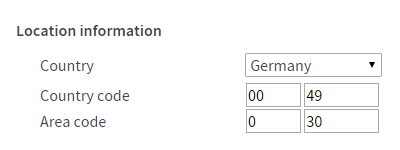
Fig.: Entering the country code and area code (e.g. for Germany and Berlin)
- For the 'Area code', enter the leading zero in the first field and the area code in the second field (for example '0' and '30' for Berlin). In some countries, area codes do not begin with a zero. The first field is left blank.
- Click on 'Apply' to save the settings. On the FRITZ!Box, confirm that the procedure may be executed, if you are asked to do so.
2 Configuring a mobile phone number
- Click on 'Telephony' in the FRITZ!Box user interface.
- Click on 'Phone Numbers' in the 'Telephony' menu.
- Click on the 'New Phone Number' button.
- Enable the 'Mobile phone number' option and click on 'Next'.
- Enter your mobile phone number and follow the wizard's instructions.
The mobile phone number is now displayed under 'Telephony > Phone Numbers' and you can assign it to your telephony devices.
If you can only use the mobile phone number for outgoing calls, you still must configure the SIM card in your mobile network operator's customer portal to react to incoming calls. Some mobile network providers disable the SIM card's telephony function when the SIM card is inserted into the FRITZ!Box.
 Deutschland
 International (English)
 United Kingdom
 Österreich
 Nederland
 España
 Italia
 Polska
 België (Nederlands)
 Luxemburg (Deutsch)
 Schweiz (Deutsch)