


Knowledge Base
go directly to the main content
To the knowledge base
Knowledge Base document #3816
Setting up the FRITZ!Box for use with a hey! cable connection
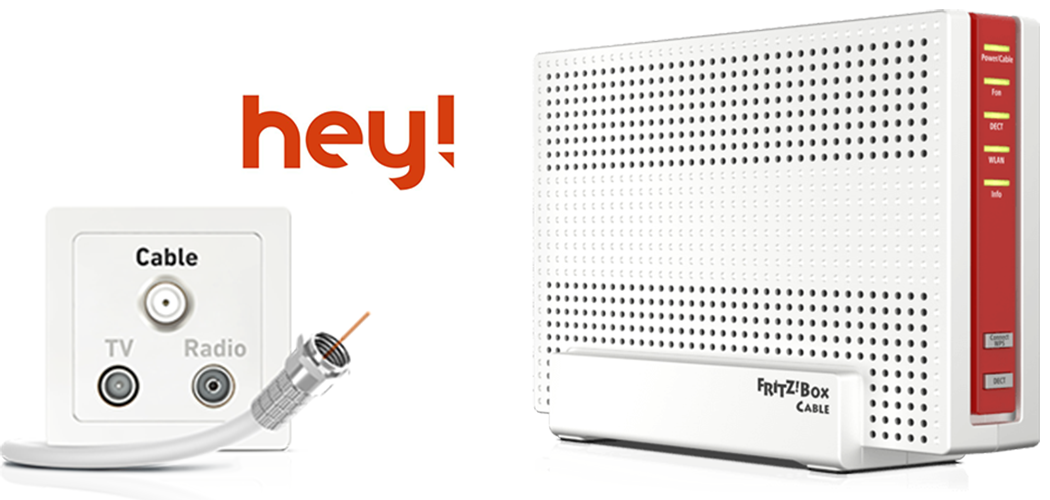
The FRITZ!Box Cable is optimally prepared for use with a hey! cable connection. Have hey! activate the FRITZ!Box, then connect it to the multimedia outlet and configure the internet connection.
The complete FRITZ!Box range of functions for internet, multimedia, and smart home is then available to all of the devices in the home network without restriction.
1 Activating the FRITZ!Box
- Call up heytelecom.be/nl/modem-free-choice in a web browser.
- Specify your customer number and your Easy Switch ID.
- For this, enter the MAC address of the cable modem you received from hey!
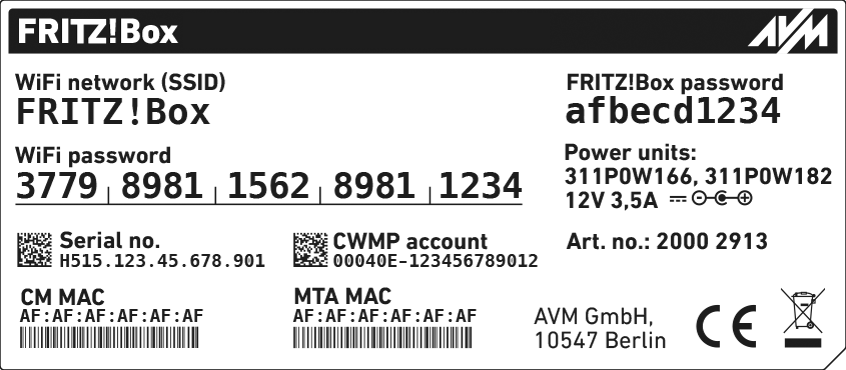
MAC address of the FRITZ!Box's cable modem (CM MAC) - For this, enter the MAC address of your FRITZ!Box's cable modem (CM MAC). You can find these on the FRITZ!Box's type label.
- Confirm the MAC address of your FRITZ!Box's cable modem (CM MAC).
- Enable the 'Mijn eigen modem' option.
- Click on 'Submit' to save the settings.
- hey! will notify you when your cable connection is set up for the use of your own terminal devices. This can take up to 5 business days.
2 Connecting the FRITZ!Box
- Insert one end of the coaxial cable into the Cable socket on the FRITZ!Box. Use the coaxial cable supplied with the FRITZ!Box, for example.
- Insert the other end of the coaxial cable into the socket for the internet connection (data socket) on the multimedia socket in your home.
3 Configuring the internet connection in the FRITZ!Box
- Open the FRITZ!Box user interface.
- Enter the FRITZ!Box password given on the type label of the FRITZ!Box and click on 'Log In'.
- If the 'Set up Internet Connection' menu is not displayed automatically:
- Click on 'Internet' and then on 'Account Information'.
- Enable the 'Internet connection via cable' option.
- Wait until the 'Power / Cable' LED remains lit. Depending on the signal strength and the way your connection is configured, this may take up to 10 minutes.
- Click on 'Apply' or 'Next' to save the settings. Restart the FRITZ!Box to complete the configuration of your internet connection.
 Deutschland
 International (English)
 United Kingdom
 Österreich
 Nederland
 España
 Italia
 Polska
 België (Nederlands)
 Luxemburg (Deutsch)
 Schweiz (Deutsch)