


Knowledge Base
go directly to the main content
- FRITZ!Box 7690
- FRITZ!Box 7682
- FRITZ!Box 7590 AX
- FRITZ!Box 7590
- FRITZ!Box 7583 VDSL
- FRITZ!Box 7583
- FRITZ!Box 7582
- FRITZ!Box 7581
- FRITZ!Box 7560
- FRITZ!Box 7530 AX
- FRITZ!Box 7530
- FRITZ!Box 7520
- FRITZ!Box 7510
- FRITZ!Box 7490
- FRITZ!Box 7430
- FRITZ!Box 7390
- FRITZ!Box 7360
- FRITZ!Box 6890 LTE
- FRITZ!Box 6670 Cable
Setting up the FRITZ!Box for use with a fiber optic connection
You want to use the FRITZ!Box with a fiber optic modem? ✔ It's easy with this guide.
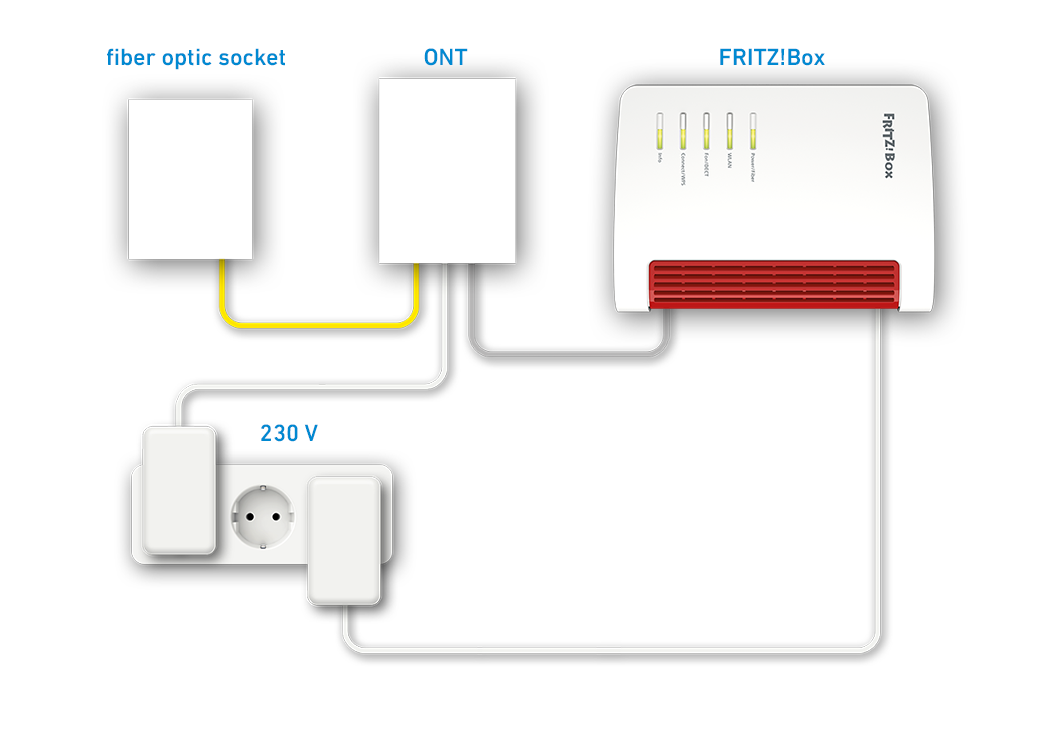
You can use your FRITZ!Box Cable not only on the cable connection, but also on the fiber optic connection (Fiber to the Home, FTTH) with an additional fiber optic modem.
Since the FRITZ!Box establishes and controls its own internet connection over the fiber optic modem, all FRITZ!Box functions (such as firewall, telephony) are also available without restriction in this operating mode.
Requirements / Restrictions
- It is not possible to access the internet if account information or a VLAN ID is required. If account information or a VLAN ID is required, the FRITZ!Box cannot be connected directly to a fiber optic modem; it must be operated behind another router.
- Some cable providers do not support this operating mode. The function 'Internet connection via "LAN 1"' is therefore not displayed if you have a FRITZ!Box from one of these providers.
1 Connecting FRITZ!Box to the fiber optic modem
- Insert one end of a network cable into the 'LAN 1' port on the FRITZ!Box. Use the network cable supplied with the FRITZ!Box, for example.
- Insert the other end of the network cable into the LAN port on the fiber optic modem (ONT, Optical Network Termination).
2 Configuring the internet connection in the FRITZ!Box
- Click on 'Internet' in the FRITZ!Box user interface.
- Click on 'Account Information' in the 'Internet' menu.
- Enable the 'Internet connection via "LAN 1"' option.
- Enter the speeds of your internet connection in the 'Downstream' and 'Upstream' fields in the 'Connection Settings' section.
- Click on 'Apply' to save the settings.
- Now the FRITZ!Box checks whether the internet connection can be established. Configuration is complete as soon as the message 'The internet connection check was successful' is displayed.
Note:If the internet connection check fails, your internet access may not have been activated yet, or account information or a VLAN ID is required. In this case, the FRITZ!Box cannot be used directly on the fiber optic modem.
3 Setting up telephony in the FRITZ!Box
If you want to connect phones to the FRITZ!Box and use them to make calls over the internet:
- Configure the internet phone numbers in the FRITZ!Box.
 Deutschland
 International (English)
 United Kingdom
 Österreich
 Nederland
 España
 Italia
 Polska
 België (Nederlands)
 Luxemburg (Deutsch)
 Schweiz (Deutsch)