


Knowledge Base
go directly to the main content
What is Multi-Link Operation (MLO)?
Multi-Link Operation (MLO) is a core feature of the new Wi-Fi standard Wi-Fi 7 which increases the data throughput and reliability of Wi-Fi connections and reduces delays in transmitting data packets (latency).
MLO allows simultaneous Wi-Fi connections across different frequency bands to be established, for example simultaneously via the 5-GHz and 6-GHz-frequency bands. In addition, wireless devices with Wi-Fi 7 can switch frequency bands without having to re-register with the wireless access point.
Prerequisites for MLO
For MLO, the FRITZ!Box and wireless device must support the Wi-Fi standard Wi-Fi 7 on at least two frequency bands. The name of the Wi-Fi network (SSID) of the FRITZ!Box must be identical for all frequency bands and the Wi-Fi connection must be encrypted with WPA mode WPA2+WPA3. Also, Wi-Fi access may not be limited to known wireless devices (MAC address filter).
Configuration
Wi-Fi connections across multiple frequency bands are automatically established if the prerequisites for MLO are met. As soon as one of the prerequisites is no longer met (for example because a frequency band is limited to Wi-Fi 6 under 'Wi-Fi > Wi-Fi Channel' in the FRITZ!Box user interface), MLO connections are no longer possible.
MLO in the FRITZ!Box user interface
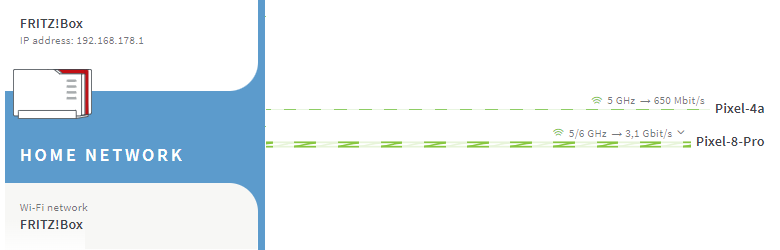
MLO connections are displayed as dual-band connections in the Mesh Overview of the FRITZ!Box:
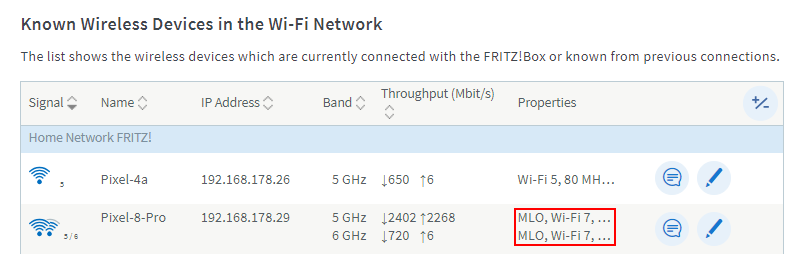
You can find out whether your wireless device supports MLO connections in the 'Properties' column of the list 'Known Wireless Devices in the Wi-Fi Network':
 Deutschland
 International (English)
 United Kingdom
 Österreich
 Nederland
 España
 Italia
 Polska
 België (Nederlands)
 Luxemburg (Deutsch)
 Schweiz (Deutsch)