


Knowledge Base
go directly to the main content
- FRITZ!Box 7690
- FRITZ!Box 7682
- FRITZ!Box 7590 AX
- FRITZ!Box 7590
- FRITZ!Box 7583 VDSL
- FRITZ!Box 7583
- FRITZ!Box 7582
- FRITZ!Box 7581
- FRITZ!Box 7560
- FRITZ!Box 7530 AX
- FRITZ!Box 7530
- FRITZ!Box 7520
- FRITZ!Box 7510
- FRITZ!Box 7490
- FRITZ!Box 7430
- FRITZ!Box 6890 LTE
- FRITZ!Box 6850 5G
- FRITZ!Box 6850 LTE
- FRITZ!Box 6820 LTE
- FRITZ!Box 6690 Cable
- FRITZ!Box 6670 Cable
- FRITZ!Box 6660 Cable
- FRITZ!Box 6591 Cable
- FRITZ!Box 6590 Cable
- FRITZ!Box 6490 Cable
- FRITZ!Box 6430 Cable
- FRITZ!Box 5690 Pro
- FRITZ!Box 5690
- FRITZ!Box 5590 Fiber
- FRITZ!Box 5530 Fiber
- FRITZ!Box 5491
- FRITZ!Box 5490
- FRITZ!Box 4060
- FRITZ!Box 4050
- FRITZ!Box 4040
- FRITZ!Box 4020
- FRITZ!Box 3490
- FRITZ!Mesh Set 4200
- FRITZ!Mesh Set 1600
- FRITZ!Repeater 6000
- FRITZ!Repeater 3000 AX
- FRITZ!Repeater 3000
- FRITZ!Repeater 2400
- FRITZ!Repeater 1750E
- FRITZ!Repeater 1200 AX
- FRITZ!Repeater 1200
- FRITZ!WLAN Repeater 1160
- FRITZ!Repeater 600
- FRITZ!WLAN Repeater 450E
- FRITZ!WLAN Repeater 310
- FRITZ!WLAN Repeater DVB-C
- FRITZ!Powerline 1260
- FRITZ!Powerline 1260E
- FRITZ!Powerline 1240 AX
- FRITZ!Powerline 1240E
- FRITZ!Powerline 546E
- FRITZ!Powerline 540E
Finding the ideal location for an extender with FRITZ!App Wi-Fi
Whether you want to use a FRITZ!Repeater, an additional FRITZ!Box, or a FRITZ!Powerline device with Wi-Fi support as a wireless extender, the correct positioning of the extender is a key factor when extending the Wi-Fi range of your home network. The quality of the connection between the extender and your FRITZ!Box is just as important as the quality of the connection between the extender and the wireless devices connected to it.
This means that when selecting a location for the extender, you must find a location where the extender can establish fast and stable connections to the FRITZ!Box, and at the same time be easily accessible to your wireless devices.
FRITZ!App Wi-Fi checks the quality of the connection between the extender and the FRITZ!Box and gives you tips on how to improve the position of your extender.
Requirements / Restrictions
- FRITZ!OS 7 or later is installed on the FRITZ!Box and the extender.
1 Using FRITZ!App Wi-Fi to check the connection quality
- Start FRITZ!App Wi-Fi.
- Tap on the 'My Repeaters' button in FRITZ!App Wi-Fi.
- Tap on the 'Evaluate Repeater Position' button.
- Now FRITZ!App Wi-Fi shows you the quality of the connection:
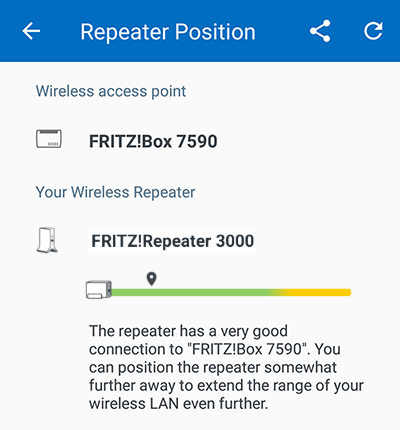
Checking the extender's position with FRITZ!App Wi-Fi - If FRITZ!App Wi-Fi recommends repositioning the extender, position it elsewhere. To find the ideal location, take the tips in this guide into account.
- After repositioning the extender, in Android tap on the
 symbol in FRITZ!App Wi-Fi again or in iOS tap on the 'Repeater not listed?' and then 'Refresh' to re-evaluate the extender's position.
2 Tips on finding the ideal location
- If possible, do not position the extender directly behind or under an obstacle such as pieces of furniture or a heater.
- Do not position the extender directly in the corner of a room.
- Position the extender so that there are as few obstacles as possible between it, the FRITZ!Box, and other wireless devices. Especially metallic objects or objects containing water, for example radiators, refrigerators, or houseplants, significantly reduce the quality of the Wi-Fi signal.
- Position the extender away from other radio transmitters, such as microwaves, wireless speakers, or Bluetooth devices.
 Deutschland
 International (English)
 United Kingdom
 Österreich
 Nederland
 España
 Italia
 Polska
 België (Nederlands)
 Luxemburg (Deutsch)
 Schweiz (Deutsch)